

Gmod crashing after hitting Play (x64 Branch)

Messages
53
Reaction score
31
Points
125
Location
Old Trafford
I tried :
-Reinstalling gmod
-Running FactoryReset.bat
-Verifying Game Files
-Unsubscribed from all addons
-Clearing all launch options and config files


running it on the normal branch makes it work but when i load into perp the game crashes please help
 
Solution
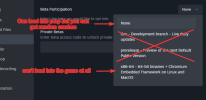
So I went to facepunch's discord server and posted the crash dump and i've been told that the crash log was consistent with using Proton on Linux. now i don't use proton or linux so i think it's an issue with steam and need to reinstall steam all together

yesterday I loaded perp on x32 and it worked fine most of the time, but whe1778425609430.pngn i opened the f1 menu the game crashed
try checking for updates. both steam and gmod.

if that doesnt work, have you recently installed any new games?

check your firewall aswell, make sure nothing is blocked steam/gmod related
steam gmod and windows are updated

latest game I installed was roblox although I don't suspect that it causes and issues

gmod is not blocked by firewall
 

please find and upload your crash dump
Code:
x86-64 beta branch
Crash dumps on the x86-64 beta branches are stored in the SteamApps/common/GarrysMod/crashes/ folder for all platforms. They have the .dmp extension.
 
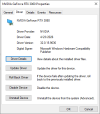
Hey there, sorry for the late reply after asking for your specs, they should not be an issue so good news is that we know it’s likely not a hardware issue!


Can you confirm the following:

When you unsubscribed from the addons, did you also uninstall them? Just being in your addon folder can cause issues (however I doubt this based on your attempts in this thread)

Which version of 64-bit have you chosen when selecting in the betas launch options? Some are more stable than others.

Do you have available space? If there is a ram spike (unlikely outcome with your specs) your computer can try to compensate by using virtual memory.

Have you deleted the cache? One corrupt cached file can screw you


Shot in the dark

This one is another shot in the dark, try a direct X fallback on your launch options: -dxlevel 95

Unfortunately this is unlikely to work based on the issues you’ve described - I’m certain you’re having an issue with workshop content or awesomium(?) usage on the server: as it is only when loading in.


The important thing

The crash log dump will be VERY helpful to determine further.
 
So I went to facepunch's discord server and posted the crash dump and i've been told that the crash log was consistent with using Proton on Linux. now i don't use proton or linux so i think it's an issue with steam and need to reinstall steam all together

yesterday I loaded perp on x32 and it worked fine most of the time, but whe1778425609430.pngn i opened the f1 menu the game crashed
 
Solution
Back
Top