
Gmod crashing after hitting Play (x64 Branch)

Messages
47
Reaction score
29
Points
100
Location
Old Trafford
I tried :
-Reinstalling gmod
-Running FactoryReset.bat
-Verifying Game Files
-Unsubscribed from all addons
-Clearing all launch options and config files


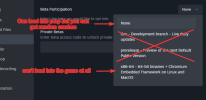
running it on the normal branch makes it work but when i load into perp the game crashes please help
 
Still the same. game opens quickly and then crashes
Just shooting blindly into the dark here but can you make sure your HDMI port is actually plugged into your GPU and not the motherboard?

Also uninstall any AMD GPU drivers using DDU. After that update your Nvidia drivers https://www.guru3d.com/download/display-driver-uninstaller-download/

This is the correct driver for Windows 11, it will install in English https://www.nvidia.com/en-eu/drivers/details/267857/
You can customize it here if you're on Windows 10 but this should also work https://www.nvidia.com/en-eu/drivers/
Make sure you select game ready driver and not studio.
 
HDMI is plugged into GPU, ill try to reinstall the drivers.

also I'd like to mention this. I started having this issue after I installed a VPN to bypass Roblox regional block, and I heard it might have caused issues with the chromium framework.
 
HDMI is plugged into GPU, ill try to reinstall the drivers.

also I'd like to mention this. I started having this issue after I installed a VPN to bypass Roblox regional block, and I heard it might have caused issues with the chromium framework.
Is the VPN still enabled? Try removing it. The UGC request is most likely workshop related and the VPN might block Steam (or Steam is blocking you) from downloading your workshop subscriptions.
 
try checking your autoexec.cfg if you have one. Also go into steam --> Gmod --> Launch options and there should be something about commands to run on start.

try deleting all of the commands in your autoexec and in that section
 
autoexec is all cleared up
Autoexec changes can still persist. Put this into your launch options, start Garry's Mod once, then wipe the launch settings.
-novid -autoconfig -default +host_writeconfig config.cfg full +mat_savechanges +quit
be aware that this gets rid of everything including binds and other settings

There is also a FactoryReset-GMod.bat file in the Garry's Mod root folder. Give that a try.
 
Just shooting blindly into the dark here but can you make sure your HDMI port is actually plugged into your GPU and not the motherboard?

Also uninstall any AMD GPU drivers using DDU. After that update your Nvidia drivers https://www.guru3d.com/download/display-driver-uninstaller-download/

This is the correct driver for Windows 11, it will install in English https://www.nvidia.com/en-eu/drivers/details/267857/
You can customize it here if you're on Windows 10 but this should also work https://www.nvidia.com/en-eu/drivers/
Make sure you select game ready driver and not studio.
still not resolved
 
-noaddons -noworkshop -nojoy -windowed
Try to run

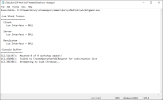
Device manager, can you screenshot your driver version of graphics card?
Run a windows update if you haven't
 
Back
Top