Download the latest Windows x64 installer (.exe)
Hello Perpheads!
Feel free to post clips of the demo tool in use!
Viewing demos is a pain in the ass! Loading times, rewinding being nearly impossible, loading some weird cs.lua you found on the forums! I have spent the last 4 odd months working on this demo player. It revolutionises demo playback, makes it so much easier to scrub through and load demos.
Here's some things to keep in mind:
- It works off of your installed files, so make sure you've got gmod and perp installed.
- It auto updates, no opening github every day!
- Demos that finished less than 15 minutes ago wont load, this is to prevent abuse.
- You need to have joined the server at the same version as the demo (just once, not every time you want to load a demo)
- Set it as the preferred application to open .dem files and you can just double click a demo to open it
- Explore the Cache settings (it makes loading demos A LOT FASTER)
Special thanks to:
- @Smeris - I couldn't have done this without your brilliant demo parser, thank you so much.
- @PotatoAnimation - Thank you for testing
- @Vollgas - Thank you for testing
- @Oddy - Thanks for helping safe proof this
- @GitHubCopilot - Thanks for building a 3d engine for me
- @miss piggy - Thanks for letting me pester you 1000 times
ps. my bank account is 3060805
Any staff members, message me on discord for immediate demo viewing.
Garry's Mod Replay
At a glance
Instant Demo Seeking
Seek through a recording, rewind, and adjust playback speed. | Choose your view
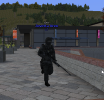
First-person, third-person, player-follow, and free-camera views. |
ESP
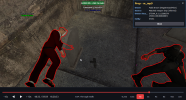
Optional ESP and player outlines. | See all information you need
Recorded PERP details, including vehicle plates, uniform badges, and fires. |
Tune the Application to your liking
Graphics, audio, HUD, and cache settings. | Made for Windows x64
A native Windows desktop demo player. |
Screenshots & clips
Home screen
View attachment 34642
Camera views
View attachment 34644
Free roam
View attachment 34645
PERP details
View attachment 34646
Settings
View attachment 34647
Display & ESP
View attachment 34648
Audio
View attachment 34649
Graphics
View attachment 34650