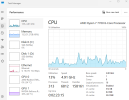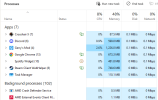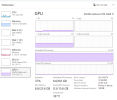


Hello, lately I've been having some issues with lag when I play. Mostly when I play perp, or anything I have had open for more than 2-3 hours.
I am using 2 monitors, my main for games, second one for netflix/youtube while I grow, etc.
After 2-3 hours of playing, my main monitor starts to "stutter" kinda, and anything I do on it lags, just like moving my mouse, typing in chat, moving ingame, but I can hear people perfectly. I then have to restart my computer for it to stop for a couple hours if im lucky.
When I'm playing I usually only have chrome, spotify, steam, crosshair x, discord and gmod open.
I have had this computer for about 2 years and no I haven't factory reset it yet, but hopefully I wont have to either if someone comes up with a solution.
I just updated my drivers aswell.
Here are my specs :
ASUS GeForce RTX 3060 Ti DUAL OC V2
AMD Ryzen 7 7700 Tray CPU
Akasa Soho H4 Plus CPU cooler
Kingston FURY Beast RGB DDR5 5600MHz 32GB
Kingston M.2 NV2 PCIe 4.0 NVMe SSD 2TB
MSI B650 Gaming Plus WIFI motherboard
Corsair RMe Series RM850e PSU
AOC 24" gamingskjerm 24G42E (Main monitor)
AOC 25" monitor 25G3ZM/BK (second monitor)
Yes I have updated my monitors to the correct Hz
I am using 2 monitors, my main for games, second one for netflix/youtube while I grow, etc.
After 2-3 hours of playing, my main monitor starts to "stutter" kinda, and anything I do on it lags, just like moving my mouse, typing in chat, moving ingame, but I can hear people perfectly. I then have to restart my computer for it to stop for a couple hours if im lucky.
When I'm playing I usually only have chrome, spotify, steam, crosshair x, discord and gmod open.
I have had this computer for about 2 years and no I haven't factory reset it yet, but hopefully I wont have to either if someone comes up with a solution.
I just updated my drivers aswell.
Here are my specs :
ASUS GeForce RTX 3060 Ti DUAL OC V2
AMD Ryzen 7 7700 Tray CPU
Akasa Soho H4 Plus CPU cooler
Kingston FURY Beast RGB DDR5 5600MHz 32GB
Kingston M.2 NV2 PCIe 4.0 NVMe SSD 2TB
MSI B650 Gaming Plus WIFI motherboard
Corsair RMe Series RM850e PSU
AOC 24" gamingskjerm 24G42E (Main monitor)
AOC 25" monitor 25G3ZM/BK (second monitor)
Yes I have updated my monitors to the correct Hz