
Arcade Cabinet Development

uie

Messages
1,130
Reaction score
1,074
Points
685
Location
POOP TRAIN
Enjoying the development of this, but I didn't want to flood the Suggestion thread. Thought I'd create a separate post for updates and stuff. Still gonna continue with it, even if it gets Denied, cause it'd be a cool addon.

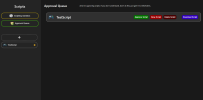
Getting the start of an approval system done, using the same colour scheme as the images API. Each script gets its own icon, a name, and the indicator for if it's accepted, pending, or denied. Having fun with this. :D

Working on the web-based sandbox to emulate the arcade screens, with the same limitations as the in-game cabinets, so people can properly test their shit before submitting it. I think it's coming along nicely.

On top of the original budget system, and inability to access code outside of the cabinet's sandbox, this makes the staff of any server running it the final line of defense, making sure anything out of the ordinary can be identified.
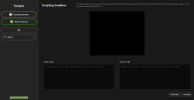
1793240775069.png​
 
Last edited:
1793329270504.png
Got the approval queue fully made. Scripting sandbox is working too, just need to add the API stuff and the budgeting system.

Crossing my fingers.​
 
Last edited:
1793415394244.png

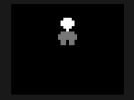
Got efficient batch-based pixel art working in-game and in the sandbox.

1793416674054.png

Got a bit carried away and made Walt Winters with it. This should let people efficiently run sprites and stuff in the game, but they have to be made procedurally. Text is done the same way, but now looks more like something that would be on an 82x66 display. There is a system in place that detects if the pixel art is beyond a certain size, and then caches it so it can be drawn as a texture, rather than data.
 
1793463542812.png
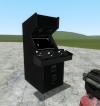
Gave the arcade cabinet model a makeover, made it look more generic. I'll set up UVs on the sides and separate materials so people can put their branding on it.

Still needs its own model to be made, but I'll get on that at the end.

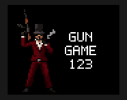
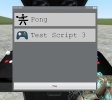
Changed up in the in-game UI to reflect the approval queue system. Still looks generic, but I like it. Only shows approved scripts.

1793464623032.png

Thinking about adding some ability to create small blip noises using some tones I downloaded, but I might leave that one out.

1793464794395.png

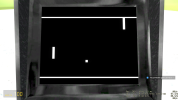
Camera also overrides when you're on a game to put your view in front of the screen. This means four players can go around the same arcade machine, and still get the same viewing experience.

Sim also suggested another part of the serverside API that could prove useful, but also difficult to program. Some kind of "online multiplayer" where you play against others at other arcade machines running the same game in the server. If one cabinet acts as host, and essentially sends messages to every cabinet in a subscribed event table, that could probably work.

Anyone see any ways this could be improved, or anything that might be a performance issue, lmk.
 
Last edited:
Is the coding the same as in Roblox studio
No I've made it worse thankfully.

It's more GMod reminiscent, but simplified down to keep development easy and maximize performance.

Code:
MAX_BOARD_HEIGHT = 40

SlotCount = 2
TickDelay = 0.1
SyncTable = { // Sync values in the global table when player goes near.
    "LeftBoardHeight",
    "RightBoardHeight",
    "BallXPos",
    "BallYPos"
}

local BoardsMoved = false

LeftBoardHeight = 0
RightBoardHeight = 0

BALL_SPEED = 2

BallHorizontal = false // Are we going right?
BallVertical = false // Are we going down?

BallXPos = ScreenWidth * 0.5
BallYPos = ScreenHeight * 0.5

function BallTick()
    if (BallVertical == true and (BallYPos - BALL_SPEED  < 10)) then
        BallVertical = false
    elseif (BallVertical == false and (BallYPos + BALL_SPEED  > (MAX_BOARD_HEIGHT + 19))) then
        BallVertical = true
    end

    BallXPos = BallXPos + (BallHorizontal and BALL_SPEED or -BALL_SPEED)
    BallYPos = BallYPos + (BallVertical and -BALL_SPEED or BALL_SPEED)

    if (BallXPos < -10 || BallXPos > ScreenWidth + 10) then
        BallXPos = ScreenWidth * 0.5
        BallYPos = ScreenHeight * 0.5

        BallVertical = true
    end

    local BallOffsetYPos = BallYPos - 10

    if (BallHorizontal == false and BallXPos == 13) then
        if (BallOffsetYPos >= LeftBoardHeight and BallOffsetYPos <= LeftBoardHeight + 10) then
            BallHorizontal = true
        end
    elseif (BallHorizontal == true and BallXPos == (ScreenWidth - 13)) then
        if (BallOffsetYPos >= RightBoardHeight and BallOffsetYPos <= RightBoardHeight + 10) then
            BallHorizontal = false
        end
    end

    SendToClient("SyncBall", BallXPos, BallYPos)
end

function Main()
    print("Main Tick")
    BoardsMoved = false

    if (KeyDown(1, KeyCodes.Forward)) then
        LeftBoardHeight = LeftBoardHeight - 5
        BoardsMoved = true
    end

    if (KeyDown(1, KeyCodes.Back)) then
        LeftBoardHeight = LeftBoardHeight + 5
        BoardsMoved = true
    end

    if (KeyDown(2, KeyCodes.Forward)) then
        RightBoardHeight = RightBoardHeight - 5
        BoardsMoved = true
    end

    if (KeyDown(2, KeyCodes.Back)) then
        RightBoardHeight = RightBoardHeight + 5
        BoardsMoved = true
    end
    
    LeftBoardHeight = math.clamp(LeftBoardHeight, 0, MAX_BOARD_HEIGHT )
    RightBoardHeight = math.clamp(RightBoardHeight , 0, MAX_BOARD_HEIGHT )

    BallTick()

    if (BoardsMoved) then
        SendToClient("SyncBoards", LeftBoardHeight, RightBoardHeight )
    end
end

Code:
MAX_BOARD_HEIGHT = 40

LeftBoardHeight = 0
RightBoardHeight = 0

BallXPos = ScreenWidth * 0.5
BallYPos = ScreenHeight * 0.5

ListenToServer("SyncBoards", function(leftHeight, rightHeight)
    if (leftHeight == nil or rightHeight == nil) then
        return
    end

    LeftBoardHeight = leftHeight
    RightBoardHeight = rightHeight
end)

ListenToServer("SyncBall", function(ballX, ballY)
    BallXPos = ballX
    BallYPos = ballY
end)

function Draw(width, height)
    if (not IsGameActive()) then
        DrawText("Pong", width * 0.5 - 10, height * 0.5 - 8, red)
        return
    end

    DrawRect(10,         10 + LeftBoardHeight, 2, 10, "white")
    DrawRect(width - 12, 10 + RightBoardHeight, 2, 10, "white")

    DrawRect(0, 9, ScreenWidth, 1, "white")
    DrawRect(0, 20 + MAX_BOARD_HEIGHT, ScreenWidth, 1, "white")

    // Ball
    DrawRect(BallXPos - 1, BallYPos - 1, 2, 2, "white")

    // Scores
    
end
 
No I mean when modding gmod is it like just coding in Roblox or different since it’s both lua
 
No I mean when modding gmod is it like just coding in Roblox or different since it’s both lua
Oh. No it's far better in GMod. GMod is probably the prime example of community modding in a game done right.

None of that matters, because people should be focusing on making a proper GMod 2 in its own dedicated engine, and then add support for big worlds.
 
Enjoying the development of this, but I didn't want to flood the Suggestion thread. Thought I'd create a separate post for updates and stuff. Still gonna continue with it, even if it gets Denied, cause it'd be a cool addon.

Getting the start of an approval system done, using the same colour scheme as the images API. Each script gets its own icon, a name, and the indicator for if it's accepted, pending, or denied. Having fun with this. :D

Working on the web-based sandbox to emulate the arcade screens, with the same limitations as the in-game cabinets, so people can properly test their shit before submitting it. I think it's coming along nicely.

On top of the original budget system, and inability to access code outside of the cabinet's sandbox, this makes the staff of any server running it the final line of defense, making sure anything out of the ordinary can be identified.

View attachment 34534​
It looks good. Besides knowing that their are other games which are not on machines but on the phone but so far it looks pretty decent.
 
  • Friendly
Reactions: uie
Back
Top